Tag: HDD Documentation

  • Bore Log Examples From Real Jobs (Directional Drilling Field Scenarios)

    Bore Log Examples From Real Jobs (Directional Drilling Field Scenarios)

    A bore log is only as strong as the way it’s used in the field.

    A clean template doesn’t make a good bore log. A perfect PDF doesn’t make a good bore log. A neat spreadsheet doesn’t make a good bore log.

    What makes a good bore log is how the information is captured while the job is moving.

    Directional drilling is not a controlled environment. It’s not linear. It’s not predictable.

    Conditions shift. Ground changes. Utilities appear. Steering corrections happen. Production speeds up or slows down. Problems show up without warning.

    This is why most “example bore logs” online are useless, they show perfect conditions, perfect numbers, and perfect days. That’s not the real world.

    Real HDD work looks like:

    • clean shots
    • messy shots
    • unexpected rock
    • unmarked utilities
    • wet clay
    • steering drift
    • delays
    • adjustments
    • production swings

    A real bore log captures all of it, not just the parts that look good.

    The examples below show what real logging looks like when the job is actually happening, not when someone is trying to remember it later.

    These are the kinds of entries that:

    • defend your footage
    • justify your hours
    • explain your production
    • protect your invoice
    • shut down disputes

    And when these entries are captured in real time using Boreva, they become even stronger, because they’re not summaries. They’re records.

    Example 1: Straight Shot, Clean Conditions

    Scenario

    This is the type of shot every driller wishes they had all day long:

    • open ground
    • no congestion
    • predictable soil
    • no utilities in the way
    • no steering corrections
    • no environmental factors slowing production

    A clean shot doesn’t mean the log can be lazy. A clean shot means the log must be tight, because this is the baseline the GC will compare everything else against.

    If your clean shots are sloppy, the GC assumes your complicated shots are worse.

    Bore Log Entry

    Shot: 1

    Entry: STA 0+00

    Exit: STA 3+00

    Planned Length: 300 ft

    Actual Length: 298 ft

    Depth: 48 in

    Ground: Clay, dry

    Start: 8:00 AM

    End: 9:10 AM

    Issues: None

    Notes: Clean shot, no steering corrections

    Why This Entry Works

    This is exactly what a clean, professional bore log entry looks like. Here’s why:

    1. The Footage Is Exact, Not Rounded

    Most crews would write:

    • “300 ft”
    • “About 300 ft”
    • “~300 ft”

    Rounded numbers kill credibility.

    298 ft shows:

    • the crew counted rods
    • the crew tracked actual footage
    • the log reflects reality, not memory

    When the GC sees exact numbers, they trust the rest of the log.

    2. Conditions Are Logged Even When Nothing Changes

    A weak log would skip the ground conditions because “nothing happened.”

    A strong log still records:

    • Clay, dry

    Why?

    Because this becomes the baseline for the rest of the day.

    If the next shot slows down, the GC can see:

    • Shot 1: dry clay → fast
    • Shot 2: wet clay → slower
    • Shot 3: mixed soil → slower

    Without this baseline, the GC assumes the crew slowed down — not the ground.

    3. The Time Window Makes Sense

    Start: 8:00 AM End: 9:10 AM

    A 298‑ft shot in 70 minutes is:

    • believable
    • consistent
    • aligned with the conditions
    • aligned with the footage

    Nothing looks inflated. Nothing looks padded. Nothing looks suspicious.

    This is the kind of entry that never gets questioned.

    4. Notes Confirm the Shot Was Clean

    “Clean shot, no steering corrections.”

    Short. Direct. Field‑credible.

    This note tells the GC:

    • the crew was in control
    • the ground was predictable
    • the alignment held
    • no adjustments were needed

    This is exactly how a clean shot should be documented.

    5. No Issues Logged And That’s Important

    A lot of crews skip the “Issues” field when nothing happens.

    A strong log explicitly says:

    • Issues: None

    This matters because:

    • it shows the field actually reviewed the shot
    • it confirms nothing slowed production
    • it prevents the GC from inventing problems later

    A blank field creates doubt. A “None” entry creates clarity.

    What This Example Really Shows

    This example isn’t about the shot. It’s about the discipline.

    A clean shot is where most crews get lazy. A clean shot is where most logs fall apart. A clean shot is where inconsistencies start.

    But a clean shot is also:

    • the baseline for the day
    • the comparison point for later delays
    • the reference point for production
    • the anchor for the GC’s expectations

    If your clean shots are logged correctly, your complicated shots have a foundation to stand on.

    This is why this example matters.

    How Boreva Handles This Shot in the Field

    With Boreva, this entry is captured:

    • when the shot finishes
    • with exact footage
    • with the correct conditions
    • with timestamps
    • with notes added immediately

    The system removes:

    • rounding
    • guessing
    • rewriting
    • end‑of‑day reconstruction

    Example 2: Rock Encounter Mid‑Shot

    Scenario

    This shot starts in soft, predictable clay, the kind of ground where production is fast and steering is easy. But halfway through the alignment, the crew hits a rock seam.

    This is a classic HDD scenario:

    • the first half of the shot drills fast
    • the second half slows down
    • steering becomes harder
    • penetration rate drops
    • the crew must adjust the head
    • the timeline shifts

    If this isn’t documented correctly, the GC will assume the crew slowed down for no reason.

    This is where a bore log either protects you or exposes you.

    Bore Log Entry

    • Shot: 2
    • Entry: STA 3+00
    • Exit: STA 6+00
    • Planned Length: 300 ft
    • Actual Length: 312 ft
    • Depth: 52 in
    • Ground: Clay transitioning to rock at 140 ft
    • Start: 9:30 AM
    • End: 12:15 PM
    • Issues: Slowed drilling due to rock
    • Notes: Steering adjustments made after rock encounter

    Why This Entry Works

    This is a textbook example of how to document a condition change that affects production.

    Let’s break down why this entry is strong.

    1. The Ground Transition Is Documented at the Exact Point It Occurred

    “Clay transitioning to rock at 140 ft.”

    This single line does more than most contractors realize:

    • it explains the slowdown
    • it explains the extra footage
    • it explains the steering corrections
    • it explains the longer timeline
    • it proves the crew was paying attention

    If you simply wrote “rocky conditions,” the GC would challenge it.

    This note is specific. Specific notes hold up.

    2. The Actual Length Increased and the Log Explains Why

    Planned: 300 ft Actual: 312 ft

    Extra footage is a red flag to a GC unless it’s documented.

    Here, the extra footage makes sense because:

    • the rock seam forced a slight alignment adjustment
    • steering corrections added distance
    • maintaining depth and clearance required a longer path

    The log ties the footage to the conditions. That’s what makes it defensible.

    3. The Timeline Matches the Conditions

    Start: 9:30 AM End: 12:15 PM

    A 312‑ft shot taking 2 hours and 45 minutes is completely reasonable in mixed clay/rock.

    If the log didn’t mention the rock seam, the GC would assume:

    • the crew slowed down
    • the crew wasn’t efficient
    • the hours are inflated

    But with the condition change documented, the timeline becomes logical.

    4. The Issue Is Logged Clearly and Directly

    “Issues: Slowed drilling due to rock.”

    Short. Accurate. Field‑credible.

    This tells the GC:

    • the slowdown had a cause
    • the cause was geological
    • the crew didn’t create the delay
    • the production rate reflects the ground, not the crew

    This is exactly how issues should be logged.

    5. The Notes Explain the Crew’s Response

    “Steering adjustments made after rock encounter.”

    This note shows:

    • the crew recognized the change
    • the crew adjusted the head
    • the crew maintained the alignment
    • the crew stayed in control

    GCs want to see that the crew responded appropriately, not blindly drilled through it.

    This note proves that.

    What This Example Really Shows

    This example demonstrates the difference between:

    • a bore log that protects your production, and
    • a bore log that forces you to defend your production

    A rock seam is not a problem, it’s a condition. But if it’s not documented, it becomes a problem later.

    This entry:

    • explains the slowdown
    • explains the extra footage
    • explains the steering corrections
    • explains the timeline
    • explains the production rate

    Everything ties together.

    This is what a strong bore log looks like.

    How Boreva Handles This Shot in the Field

    With Boreva, this entry is captured:

    • the moment the rock seam is hit
    • with the exact footage
    • with the condition change logged immediately
    • with the steering adjustments noted
    • with timestamps that match the slowdown

    The system removes:

    • end‑of‑day guessing
    • vague notes
    • missing condition changes
    • unexplained production swings

    The log becomes a real‑time record, not a reconstruction.

    Example 3: Utility Conflict and Delay

    Scenario

    This is the shot that separates disciplined logging from “we’ll remember it later.”

    The crew is drilling through mixed soil, nothing unusual. Production is steady. Steering is controlled. Everything is on track.

    Then at 180 ft, the locator picks up something that wasn’t on the prints:

    • an unmarked utility
    • shallow
    • directly in the planned path
    • requiring immediate action

    This is a real HDD moment:

    • drilling stops
    • the crew potholes
    • the inspector gets involved
    • the alignment must be adjusted
    • the delay grows
    • the timeline shifts

    If this isn’t logged correctly, the GC will absolutely challenge the hours.

    This is where a bore log either protects your invoice — or destroys it.

    Bore Log Entry

    • Shot: 3
    • Entry: STA 6+00
    • Exit: STA 9+00
    • Planned Length: 300 ft
    • Actual Length: 287 ft
    • Depth: 60 in
    • Ground: Mixed soil
    • Start: 1:00 PM
    • End: 4:30 PM
    • Issues: Utility conflict at 180 ft, 1.5‑hour delay
    • Notes: Path adjusted to maintain clearance

    Why This Entry Works

    This is one of the strongest examples in the entire article because it shows how to document a delay in a way that cannot be disputed.

    Let’s break down why this entry is airtight.

    1. The Utility Conflict Is Logged at the Exact Footage

    “Utility conflict at 180 ft.”

    This is the difference between:

    • a believable delay
    • and a questionable delay

    This single detail proves:

    • the crew identified the conflict precisely
    • the conflict occurred mid‑shot
    • the delay had a real cause
    • the crew was paying attention
    • the log wasn’t filled out later

    GCs trust specifics. They attack generalities.

    This is specific.

    2. The Delay Is Quantified, Not Estimated

    “1.5‑hour delay.”

    Not:

    • “about an hour”
    • “roughly 90 minutes”
    • “some delay”

    A quantified delay shows:

    • the crew tracked the time
    • the delay was real
    • the delay was significant
    • the delay was not padded

    This is exactly how delay documentation should look.

    3. The Actual Length Is Shorter And the Log Explains Why

    Planned: 300 ft Actual: 287 ft

    Shorter footage is just as important to document as longer footage.

    Why?

    Because it shows:

    • the alignment was adjusted
    • the exit point shifted
    • the crew maintained clearance
    • the path changed due to the utility

    If the footage changed and the log didn’t explain it, the GC would assume:

    • the crew mis‑drilled
    • the footage is inaccurate
    • the log is unreliable

    This entry removes all doubt.

    4. The Timeline Matches the Delay

    Start: 1:00 PM End: 4:30 PM

    A 287‑ft shot taking 3.5 hours is completely reasonable with:

    • a utility conflict
    • potholing
    • inspector involvement
    • alignment adjustments

    The timeline aligns perfectly with the documented delay.

    This is what makes the entry defensible.

    5. The Notes Explain the Crew’s Response

    “Path adjusted to maintain clearance.”

    This note shows:

    • the crew made the correct decision
    • the crew followed safety and clearance requirements
    • the crew didn’t force the alignment
    • the crew maintained control
    • the crew acted professionally

    GCs want to see that the crew responded appropriately — not recklessly.

    This note proves that.

    What This Example Really Shows

    This example demonstrates the core purpose of a bore log:

    To explain why the day unfolded the way it did.

    A utility conflict is not a mistake. A utility conflict is not a crew problem. A utility conflict is not a production failure.

    A utility conflict is a condition.

    But if it’s not documented:

    • the GC will deny the delay
    • the GC will question the hours
    • the GC will challenge the footage
    • the GC will reduce the invoice

    This entry eliminates all of that.

    It ties:

    • the delay
    • the footage
    • the timeline
    • the adjustment
    • the conditions

    …into one clean, defensible record.

    This is exactly how a bore log protects your money.

    How Boreva Handles This Shot in the Field

    With Boreva, this entry is captured:

    • the moment the utility is detected
    • with the exact footage
    • with the delay timer running automatically
    • with the condition change logged immediately
    • with notes added in real time
    • with timestamps that match the slowdown

    The system removes:

    • forgotten delays
    • vague descriptions
    • missing footage changes
    • end‑of‑day reconstruction
    • “we think it was around an hour”

    The log becomes a real‑time record, not a memory exercise.

    This is the difference between:

    • a delay the GC denies
    • and a delay the GC pays

    Example 4: Wet Conditions and Steering Difficulty

    Scenario

    This shot starts like a normal clay shot, predictable, steady, and easy to control. But as the crew progresses, the ground moisture increases. The clay becomes slick. The head starts to skate. Steering corrections become more frequent. Penetration rate drops. The bore path becomes harder to hold.

    This is a classic HDD scenario where:

    • the ground doesn’t change type
    • the ground changes behavior

    And if the log doesn’t capture that shift, the GC will assume the crew simply slowed down.

    Moisture is invisible to the inspector unless you document it.

    Bore Log Entry

    • Shot: 4
    • Entry: STA 9+00
    • Exit: STA 12+00
    • Planned Length: 300 ft
    • Actual Length: 305 ft
    • Depth: 50 in
    • Ground: Wet clay
    • Start: 8:00 AM
    • End: 11:45 AM
    • Issues: Steering difficulty due to wet conditions
    • Notes: Slower advancement, additional corrections required

    Why This Entry Works

    This is exactly how to document moisture‑related production changes in a way that holds up under review.

    Let’s break down why this entry is strong.

    1. “Wet Clay” Is a Real Condition, Not a Throwaway Note

    Most crews write:

    • “Wet ground”
    • “Moist soil”
    • “Soft conditions”

    Those notes mean nothing to a GC.

    “Wet clay” is specific and meaningful because:

    • wet clay behaves differently than dry clay
    • steering becomes harder
    • the head slides instead of biting
    • corrections increase
    • production slows
    • the bore path becomes more sensitive

    This note tells the GC exactly what changed.

    2. The Timeline Reflects the Conditions

    Start: 8:00 AM End: 11:45 AM

    A 305‑ft shot taking 3 hours and 45 minutes is completely reasonable in wet clay.

    Without the moisture note, the GC sees:

    • long shot
    • slow production
    • no documented reason

    That’s when they start asking questions.

    With the moisture note, the timeline makes sense.

    3. The Actual Length Increased and the Log Explains Why

    Planned: 300 ft Actual: 305 ft

    Wet clay often forces:

    • micro‑corrections
    • slight path adjustments
    • small deviations to maintain depth
    • additional steering inputs

    Those adjustments add footage.

    If the log didn’t explain the moisture and steering difficulty, the GC would assume:

    • the crew drifted
    • the footage is inaccurate
    • the log is unreliable

    This entry ties the footage to the conditions.

    4. The Issue Is Logged Clearly and Directly

    “Issues: Steering difficulty due to wet conditions.”

    This is exactly how an issue should be documented:

    • cause
    • effect
    • impact

    It shows:

    • the crew identified the problem
    • the problem was environmental
    • the slowdown was justified
    • the production rate reflects the ground, not the crew

    GCs trust logs that show cause‑and‑effect.

    5. The Notes Explain the Crew’s Response

    “Slower advancement, additional corrections required.”

    This note shows:

    • the crew stayed in control
    • the crew adjusted their drilling approach
    • the crew maintained the alignment
    • the crew didn’t force the head
    • the crew worked safely

    GCs want to see that the crew responded appropriately — not recklessly.

    This note proves that.

    What This Example Really Shows

    This example demonstrates how to document behavioral ground changes, not just material changes.

    Wet clay is still clay, but it drills completely differently.

    This entry:

    • explains the slower production
    • explains the extra footage
    • explains the steering corrections
    • explains the timeline
    • explains the conditions

    Everything ties together.

    This is what a strong bore log looks like.

    How Boreva Handles This Shot in the Field

    With Boreva, this entry is captured:

    • the moment the steering difficulty starts
    • with the correct ground condition selected
    • with the slowdown timestamped
    • with notes added immediately
    • with footage tied to the shot in real time

    The system removes:

    • vague “wet ground” notes
    • forgotten steering issues
    • unexplained production swings
    • end‑of‑day reconstruction

    The log becomes a real‑time record, not a memory exercise.

    This is the difference between:

    • a moisture‑related slowdown the GC denies
    • and a moisture‑related slowdown the GC accept

    Example 5: Poor Logging vs Proper Logging

    This is the most important example in the entire article because it shows the truth:

    Most bore logs don’t fail because the job was complicated. They fail because the logging was weak.

    Two crews can drill the same shot. One produces a log that protects their invoice. The other produces a log that gets questioned, reduced, or denied.

    This example shows exactly why.

    🔴 Weak Entry

    “Drilled 300 ft. Slow conditions.”

    This is the kind of entry that gets contractors in trouble.

    Here’s why it fails:

    1. No Shot Number

    The GC can’t tie it to the alignment.

    2. No Entry/Exit Stations

    There’s no location reference.

    3. No Actual Footage

    “300 ft” is a rounded guess, not a measurement.

    4. No Ground Conditions

    The GC has no idea what the crew drilled through.

    5. No Depth

    Depth is critical for clearance, safety, and production.

    6. No Timeline

    Without start/end times, the GC will challenge the hours.

    7. No Issue Description

    “Slow conditions” is meaningless. Slow compared to what? Why slow? What caused it?

    8. No Notes

    Nothing explains the situation.

    This entry forces the GC to fill in the blanks — and they will always fill them in against the contractor.

    This is how disputes start.

    Strong Entry

    • Shot: 5
    • Entry: STA 12+00
    • Exit: STA 15+00
    • Actual Length: 296 ft
    • Ground: Mixed clay and sand
    • Issues: Steering drift at 200 ft, corrected
    • Notes: Additional time required to maintain path

    This is the exact same shot — but documented correctly.

    Let’s break down why this entry is bulletproof.

    Why This Entry Works

    1. Exact Footage (296 ft)

    Not rounded. Not estimated. Not “about 300.”

    Exact footage shows:

    • rods were counted
    • the crew tracked the shot
    • the log reflects reality

    GCs trust exact numbers.

    2. Entry and Exit Stations

    STA 12+00 → STA 15+00

    This ties the shot to:

    • the alignment
    • the plan
    • the as‑built
    • the inspector’s notes

    It proves the crew drilled where they were supposed to.

    3. Ground Conditions Are Specific

    “Mixed clay and sand.”

    This matters because:

    • mixed ground causes drift
    • drift requires corrections
    • corrections slow production

    The GC now understands the environment.

    4. The Issue Is Documented Clearly

    “Steering drift at 200 ft, corrected.”

    This shows:

    • the crew identified the problem
    • the problem had a specific cause
    • the crew corrected it
    • the alignment was maintained

    This is exactly what a GC wants to see.

    5. Notes Explain the Impact

    “Additional time required to maintain path.”

    This ties everything together:

    • the drift
    • the corrections
    • the slower production
    • the timeline

    The GC now understands why the shot took longer.

    What This Example Really Shows

    This example proves a simple truth:

    Weak logs create questions. Strong logs answer them.

    A weak log forces the GC to:

    • guess
    • assume
    • challenge
    • reduce
    • deny

    A strong log:

    • explains the conditions
    • explains the problems
    • explains the corrections
    • explains the timeline
    • explains the footage

    A strong log removes the GC’s leverage.

    This is the difference between:

    • a contractor who gets paid
    • and a contractor who gets picked apart

    How Boreva Handles This Shot in the Field

    With Boreva, the strong entry becomes the default because the system:

    • forces exact footage
    • forces shot‑by‑shot entries
    • forces condition selection
    • forces issue documentation
    • timestamps everything
    • ties notes to the moment they happen

    The weak entry becomes impossible.

    The strong entry becomes automatic.

    This is how Boreva eliminates disputes before they start.

    What All Strong Bore Logs Have in Common

    Every strong bore log — no matter the job, the ground, the crew, or the conditions — follows the same structure.

    It doesn’t matter whether the shot is:

    • clean
    • messy
    • long
    • short
    • in clay
    • in sand
    • in rock
    • in mixed ground
    • in wet conditions
    • in congested utilities

    The pattern is identical.

    Weak contractors think bore logs are “notes.” Strong contractors know bore logs are records.

    Here’s what every strong bore log has in common.

    1. Each Shot Is Logged Separately

    A weak log lumps the entire day into one line:

    “Drilled 900 ft today.”

    That’s not a bore log. That’s a summary.

    A strong bore log breaks the day into:

    • Shot 1
    • Shot 2
    • Shot 3
    • Shot 4
    • etc.

    Each shot has:

    • its own conditions
    • its own problems
    • its own timeline
    • its own footage
    • its own notes

    This is how you show the GC exactly what happened — and when.

    2. Footage Is Exact, Never Rounded

    Weak logs use:

    • “300 ft”
    • “~300 ft”
    • “about 300 ft”

    Rounded numbers scream:

    • guessing
    • memory
    • end‑of‑day reconstruction

    Strong logs use:

    • 298 ft
    • 312 ft
    • 287 ft
    • 296 ft

    Exact footage shows:

    • rods were counted
    • the crew tracked the shot
    • the log reflects reality

    GCs trust exact numbers. They attack rounded ones.

    3. Conditions Are Clear and Specific

    Weak logs say:

    • “hard ground”
    • “wet”
    • “slow drilling”

    These notes mean nothing.

    Strong logs say:

    • “Clay transitioning to rock at 140 ft.”
    • “Wet clay causing steering drift.”
    • “Mixed soil with sand pockets.”

    These notes:

    • explain production
    • explain delays
    • explain corrections
    • explain footage changes

    Conditions are the why behind the numbers.

    4. Problems Are Recorded When They Happen

    Weak logs say:

    • “some delays”
    • “equipment issues”
    • “slow conditions”

    These notes are useless.

    Strong logs say:

    • “Utility conflict at 180 ft — 1.5‑hour delay.”
    • “Steering drift at 200 ft — corrected.”
    • “Rock seam encountered — slowed penetration rate.”

    These notes:

    • document the cause
    • document the impact
    • document the timeline

    Problems don’t hurt you. Undocumented problems hurt you.

    5. Notes Explain the Situation, Not Just the Result

    Weak logs say:

    • “slow shot”
    • “tough ground”
    • “took longer than expected”

    Strong logs say:

    • “Additional corrections required due to wet clay.”
    • “Alignment adjusted to maintain clearance.”
    • “Steering adjustments made after rock encounter.”

    Notes are where the GC learns:

    • what happened
    • why it happened
    • how the crew responded

    Notes turn numbers into a story — and stories are defensible.

    Why This Pattern Matters

    This pattern is what makes a bore log:

    • credible
    • consistent
    • defensible
    • professional
    • impossible to argue with

    GCs don’t reduce strong logs. They reduce weak ones.

    A strong bore log:

    • explains the day
    • protects the hours
    • justifies the footage
    • documents the conditions
    • records the problems
    • shows the corrections
    • ties everything together

    This is how contractors stop losing money on paperwork.

    How Boreva Enforces This Pattern Automatically

    With Boreva, this pattern becomes the default because the system:

    • forces shot‑by‑shot entries
    • forces exact footage
    • forces condition selection
    • forces issue documentation
    • timestamps everything
    • ties notes to the moment they happen

    Weak logs become impossible. Strong logs become automatic.

    This is how Boreva eliminates disputes before they start.

    What This Looks Like in the Field

    Everything in the examples above has one thing in common:

    They only work if they’re logged when the work happens.

    A bore log is not a form. A bore log is not paperwork. A bore log is not something you “fill out later.”

    A bore log is a real‑time record of the shot.

    And that’s exactly how Boreva is built, not as a template, but as a field system that captures the job as it unfolds.

    Here’s what these examples look like when they’re actually happening in the field.

    1. Shots Are Logged the Moment They Finish

    In the field, the driller or locator doesn’t wait until the end of the day.

    The moment a shot is completed:

    • the footage is entered
    • the conditions are selected
    • the notes are added
    • the timestamp is captured automatically

    This eliminates:

    • rounded numbers
    • forgotten details
    • mismatched footage
    • “we’ll fill it out later” errors

    The bore log becomes a live record, not a reconstruction.

    2. Condition Changes Are Captured When They Happen

    When the ground shifts:

    • clay → rock
    • dry → wet
    • sand pockets appear
    • steering becomes harder
    • penetration rate changes

    The crew logs it immediately.

    This is critical because:

    • conditions explain production
    • conditions explain delays
    • conditions explain footage changes
    • conditions explain steering corrections

    If you wait until the end of the day, these details disappear.

    Boreva forces the crew to capture them in the moment.

    3. Problems and Delays Are Logged With Timestamps

    This is where most contractors lose money.

    Delays get forgotten. Problems get summarized. Timelines get rounded. GCs challenge everything.

    With Boreva, when a problem occurs:

    • the crew taps “Add Issue”
    • the delay timer starts
    • the description is added
    • the timestamp is locked
    • the duration is calculated automatically

    This turns:

    • “We had a delay” into
    • “Utility conflict at 180 ft — 1.5‑hour delay.”

    GCs don’t argue with timestamps.

    4. Notes Are Added During the Work, Not After

    Notes are where the context lives.

    In the field, notes get added:

    • when the inspector says something
    • when the customer gives direction
    • when the alignment changes
    • when the ground shifts
    • when the crew makes a correction

    These notes explain:

    • why the shot took longer
    • why the footage changed
    • why the production slowed
    • why the alignment shifted

    Boreva ties each note to:

    • the shot
    • the time
    • the conditions
    • the issue

    This is what makes the log defensible.

    5. The Daily Report Builds Itself Automatically

    By the time the crew clocks out:

    • every shot is logged
    • every condition is documented
    • every delay is timestamped
    • every note is tied to the moment it happened
    • every issue is recorded
    • every timeline is accurate

    The daily report is already complete.

    There is no:

    • rewriting
    • guessing
    • reconstructing
    • filling in blanks
    • “what time did that happen?”
    • “how long were we down?”

    The report is built from real‑time field entries, not memory.

    This is the difference between:

    • a report the GC questions
    • and a report the GC accepts

    Why This Matters

    The examples in this article are strong because they follow the rules of real‑time logging.

    Boreva makes those rules automatic.

    It turns:

    • clean shots
    • messy shots
    • rock encounters
    • utility conflicts
    • wet conditions
    • steering drift
    • delays
    • corrections

    …into structured, timestamped, defensible entries.

    This is what real HDD documentation looks like.

    This is what protects your hours. This is what protects your footage. This is what protects your invoice.
  • Directional Drilling Bore Log: What It Is, How to Fill It Out, and Why It Protects Your Money

    Directional Drilling Bore Log: What It Is, How to Fill It Out, and Why It Protects Your Money

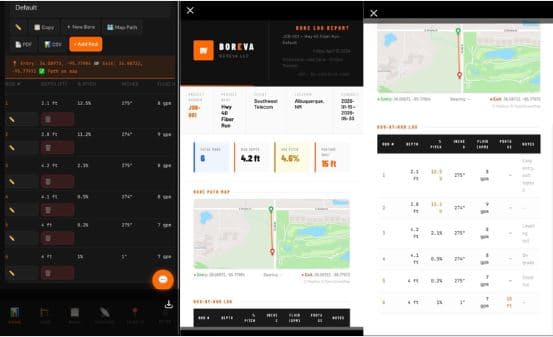
    Directional drilling bore log example used for HDD documentation

    If you’ve ever been on a directional drilling job where the numbers didn’t add up, you already know the truth: the argument never starts in the field. It starts later, in an office, on a phone call, or across a conference table, when someone pulls out the contract and asks you to justify what happened.

    And in that moment, one document decides whether you get paid fairly or get squeezed:

    Your directional drilling bore log.

    Most crews don’t realize how much power this one sheet of paper holds. They see it as busywork. Something to fill out at the end of the day. Something that “doesn’t matter” because everyone saw what happened.

    But here’s the reality:

    • Memory fades
    • Opinions differ
    • Plans are wrong
    • Inspectors change
    • GCs forget what they agreed to
    • And when money is on the line, everyone suddenly remembers things differently

    A bore log cuts through all of that.

    It is the official recordof what happened underground, the part of the job nobody can see, nobody can measure after the fact, and nobody can verify without documentation.

    If it’s not in the bore log, it’s almost impossible to prove later.

    That’s why this article exists. To show you:

    • What a directional drilling bore log actually is
    • What belongs in it
    • How to fill it out correctly
    • The mistakes that cost contractors money
    • How inspectors use it
    • Why it protects you during disputes
    • And how digital bore logs are changing the industry

    By the end, you’ll understand exactly why the bore log is one of the most valuable tools on any HDD job and how to use it to protect your production, your schedule, and your profit.

    What Is a Directional Drilling Bore Log?

    If you ask ten different people on a jobsite what a bore log is, you’ll get ten different answers. Some will say it’s a daily report. Some will say it’s a production sheet. Others will shrug and call it “that thing the foreman fills out.”

    But here’s the real definition, the one that actually matters when money, time, and accountability are on the line:

    A directional drilling bore log is the official, factual, defensible record of every bore shot completed on a job.

    It’s not a guess. It’s not a memory. It’s not a summary.

    It is the ground truth of what happened underground.

    This matters

    Directional drilling is unique because most of the work happens where nobody can see it. You can’t walk the trench. You can’t measure the cut. You can’t point to the rock you hit or the water table you punched through.

    The bore log becomes the only way to document:

    • How far you drilled
    • Where you drilled
    • What you installed
    • What conditions you encountered
    • How long it took
    • What slowed you down

    Without that record, you’re relying on opinions and opinions don’t hold up in meetings, disputes, or inspections.

    What a bore log actually tracks

    A proper HDD bore log includes the details that tell the full story of the shot:

    • Bore length — the exact footage drilled
    • Entry and exit points — where the shot started and where it surfaced
    • Depth — critical for compliance and conflict avoidance
    • Product installed — conduit, fiber, pipe, etc.
    • Ground conditions — dirt, clay, sand, rock, water
    • Time and production — when you started, when you finished, and how long it took

    These aren’t just numbers. They’re evidence.

    Why Bore Logs Matter

    If you’ve ever sat in a progress meeting where someone questioned your footage, your timeline, or your invoice, you already know how fast the conversation can turn against you. One minute everyone is nodding along, and the next minute someone says:

    “Hold on, how do we know this is accurate?”

    That’s the moment when the bore log becomes the most important document on the entire project.

    Most crews underestimate this. They think the bore log is something the office wants “for paperwork.” They think it’s a formality. They think it’s something you fill out at the end of the day because someone told you to.

    But here’s the truth:

    Every problem on a job eventually becomes a question. And every question eventually becomes a challenge.

    • “How much did you drill?”
    • “Why did this take longer than expected?”
    • “Why is this over budget?”
    • “Why didn’t you hit production numbers?”
    • “Why are you requesting a change order?”

    If you don’t have a bore log, you’re not answering those questions, you’re guessing. And guessing loses every time against someone holding a contract.

    The three ways a bore log protects you

    A bore log isn’t just a record. It’s a shield. It protects you in three critical ways:

    1. It proves footage.

    Footage is money. If you can’t prove how much you drilled, you’re leaving the door wide open for someone to dispute your invoice.

    A clean bore log removes the argument. It shows the exact footage drilled on every shot, every day.

    2. It explains conditions.

    Ground conditions are the biggest variable in directional drilling. Clay slows you down. Rock destroys production. Water changes everything.

    When the bore log documents these conditions, you can clearly show why production changed and why the schedule or budget needs to adjust.

    Without that documentation, it looks like you simply didn’t perform.

    3. It justifies changes.

    Plans are wrong all the time. Depths change. Utilities appear where they shouldn’t. The ground doesn’t match the geotech report.

    A bore log gives you the evidence you need to support:

    • Change orders
    • Additional billing
    • Extra time
    • Equipment adjustments
    • Crew extensions

    It’s not about arguing harder, it’s about proving your case.

    What Should Be Included in a Bore Log

    A lot of contractors think they’re keeping a bore log when they jot down a few numbers on a clipboard. But a real directional drilling bore log, the kind that protects you in meetings, disputes, and inspections, is far more detailed than most crews realize.

    Think of the bore log as the story of the shot. If someone wasn’t there, they should be able to read the log and understand exactly what happened, why it happened, and how it affected production.

    That means the log must include every detail that impacts time, money, or quality.

    Let’s break down what belongs in a complete, defensible HDD bore log.

    Basic Job Information

    This is the foundation. It identifies the job and ties the log to a specific date, crew, and location.

    Include:

    • Job name — the project identifier
    • Location — street, intersection, or GPS
    • Date — the day the shot was completed
    • Crew — who was on site

    This seems simple, but missing basic info is one of the top reasons logs get dismissed in disputes. If the log isn’t tied to a specific day and crew, it’s easy for someone to question its accuracy.

    Bore Details

    This is where you document the physical characteristics of the shot.

    Include:

    • Shot number — every bore should be numbered
    • Start and end points — where the drill entered and exited
    • Bore length — exact footage drilled
    • Depth — critical for compliance and conflict avoidance

    These details matter because they prove:

    • How far you drilled
    • Whether you followed the plan
    • Whether you avoided conflicts
    • Whether the shot was completed as designed

    If a GC or inspector challenges your footage or alignment, this section is your first line of defense.

    Production Information

    This is where you show how long the shot took and what was installed.

    Include:

    • Time started and finished — the actual production window
    • Total footage drilled — not rounded, not estimated
    • Product installed — conduit, fiber, pipe, etc.

    This section answers the questions that always come up later:

    • “Why did this take longer than expected?”
    • “Why didn’t you hit production numbers?”
    • “Why is this day billed differently?”

    When your production data is clean, you can justify your schedule and your invoice without arguing.

    Ground Conditions

    Ground conditions are the biggest variable in directional drilling and the biggest justification for delays, slowdowns, and change orders.

    Document:

    • Dirt, rock, sand, clay
    • Wet or dry conditions
    • Any changes during the bore

    This is where most contractors lose money. If you don’t document the ground, you can’t prove:

    • Why production slowed
    • Why tooling wore out
    • Why the shot took longer
    • Why you need a change order

    A GC can argue with your opinion. They can’t argue with documented conditions.

    Issues and Delays

    This is the section that saves contractors thousands of dollars, if they fill it out honestly and consistently.

    Document:

    • Equipment problems — breakdowns, tooling failures, rod issues
    • Utility conflicts — mismarked lines, unexpected crossings
    • Weather delays — rain, mud, frozen ground

    This is the evidence you need when someone says:

    “You should have finished this shot yesterday.”

    If the log shows the delays as they happened, your case is airtight.

    Notes

    This is the catch‑all section and it’s more important than most crews realize.

    Write down anything that explains:

    • Why the job didn’t go as planned
    • Why production changed
    • Why the schedule shifted
    • Why the footage doesn’t match the estimate

    If it affects time, money, or quality, it belongs in the log.

    How to Fill Out a Directional Drilling Bore Log (The Right Way)

    If there’s one section in this entire article that can save a contractor the most money, it’s this one. Because the truth is simple:

    Most crews lose money because of how they document the drilling.

    A bore log is only as strong as the information you put into it. And the biggest mistake crews make is treating the log like something you fill out “when you get a minute”, usually at the end of the day, when the details are fuzzy, the pressure is off, and the memory is already fading.

    A bore log filled out at the end of the day is a bore log filled with guesses. And guesses don’t hold up in meetings, disputes, or inspections.

    Here’s how to fill out a bore log the right way, the way that protects your production, your schedule, and your money.

    Step 1: Log Every Bore Shot Immediately

    This is the golden rule.

    As soon as a shot is completed, the details go into the log:

    • Footage
    • Depth
    • Conditions
    • Time
    • Issues

    Not later. Not after lunch. Not at the end of the day.

    Right now.

    Why? Because memory changes under pressure. And when you’re drilling, you’re under pressure all day long.

    If you wait, you’ll forget:

    • The exact footage
    • The moment the ground changed
    • The delay that slowed you down
    • The utility you had to work around
    • The equipment issue that cost you 45 minutes

    Those details matter and they disappear fast.

    Step 2: Record Actual Footage, Not Estimated Footage

    This is another place where contractors lose money.

    Rounding is easy. Estimating is easy. Guessing is easy.

    But when someone challenges your invoice, “easy” becomes expensive.

    Actual footage is defensible. Estimated footage is not.

    If the log says 412 feet, it better be 412 feet, not “around 400.”

    Precision builds credibility. Credibility wins disputes.

    Step 3: Write Down Ground Conditions Honestly

    Ground conditions are the biggest justification for:

    • Slow production
    • Tooling changes
    • Schedule adjustments
    • Change orders
    • Additional billing

    But only if they’re documented.

    If you hit rock, write it down. If the ground turned wet, write it down. If you transitioned from clay to sand, write it down.

    These details explain the story of the shot.

    Without them, it looks like you simply didn’t perform.

    Step 4: Capture Problems as They Happen

    Every job has problems. That’s normal.

    What’s not normal is failing to document them.

    If you wait until later, the story gets weaker. If you write it down immediately, the story becomes undeniable.

    Document:

    • Equipment failures
    • Rod issues
    • Locator problems
    • Utility conflicts
    • Weather delays
    • Traffic or access issues

    These aren’t excuses, they’re facts. And facts protect you.

    Step 5: Be Consistent Every Single Day

    A bore log is only powerful if it’s complete.

    If you have:

    • Missing days
    • Missing shots
    • Missing details
    • Gaps in production
    • Inconsistent entries

    Then your entire log becomes questionable.

    And once someone doubts one part of your documentation, they start doubting all of it.

    Consistency builds trust. Trust builds leverage. Leverage protects your money.

    Common Bore Log Mistakes That Cost Contractors Money

    If you’ve ever looked at a job and thought, “We should’ve made more on this,” there’s a good chance the problem wasn’t the drilling, it was the documentation.

    Directional drilling is predictable. Paperwork is not. And the fastest way for a profitable job to turn into a financial headache is through a sloppy bore log.

    Most contractors don’t lose money because they drilled the wrong way. They lose money because they documented the right work the wrong way.

    Here are the most common bore log mistakes that show up later in billing, disputes, and inspections and how to avoid them.

    Mistake #1: Logging at the End of the Day

    This is the number one reason bore logs fall apart.

    When crews wait until the end of the day to fill out the log, they’re relying on:

    • Memory
    • Estimates
    • Assumptions
    • “Close enough” numbers

    But memory is unreliable, especially after a long day of drilling, troubleshooting, and dealing with jobsite chaos.

    What gets lost?

    • Exact footage
    • Depth changes
    • Ground transitions
    • Delays
    • Utility conflicts
    • Equipment issues

    These missing details become expensive later.

    Fix: Log each shot immediately. Not later. Not after lunch. Not at the end of the day.

    Mistake #2: Rounding Footage

    Rounding seems harmless, until someone challenges your invoice.

    If you drilled 412 feet and you write down “400,” you just gave away 12 feet of billable work.

    Now multiply that by:

    • 20 shots
    • 60 shots
    • 200 shots

    Suddenly you’re giving away thousands of dollars in production.

    And here’s the bigger issue:

    When you round once, people assume you rounded everywhere.

    Your entire log becomes questionable.

    Fix: Record exact footage. Precision builds credibility.

    Mistake #3: Skipping Ground Conditions

    Ground conditions are the #1 justification for:

    • Slow production
    • Tooling changes
    • Schedule adjustments
    • Change orders
    • Additional billing

    But if you don’t document the conditions, you can’t prove any of it.

    Skipping ground conditions is like drilling blind and billing blind.

    Fix: Document every condition change. Clay, sand, rock, water, write it down.

    Mistake #4: Leaving Out Problems

    Every job has problems. That’s normal.

    What’s not normal is failing to document them.

    If you don’t write down:

    • Equipment failures
    • Locator issues
    • Rod problems
    • Utility conflicts
    • Weather delays
    • Access issues

    Then none of those things “happened” when someone reviews the job later.

    And if they didn’t “happen,” you can’t bill for them.

    Fix: Document problems as they happen. Not later. Not tomorrow. Now.

    Mistake #5: Treating the Bore Log Like Paperwork

    This is the mindset that costs contractors the most money.

    When crews think the bore log is “just paperwork,” they:

    • Rush it
    • Skip details
    • Fill it out inconsistently
    • Leave out important notes
    • Treat it like a chore instead of a tool

    But the bore log isn’t paperwork. It’s protection.

    It’s the document that decides whether you get paid fairly or get squeezed.

    Fix: Treat the bore log like a legal document.

    Bore Logs and Billing Disputes

    If you’ve been in directional drilling long enough, you know this part of the job isn’t about drilling, it’s about proving what you drilled. And nothing brings that reality into focus faster than a billing dispute.

    Billing disputes don’t start with anger. They start with doubt.

    A GC, inspector, or project manager looks at your invoice and thinks:

    • “This seems high.”
    • “This took longer than expected.”
    • “This doesn’t match the estimate.”
    • “Why is this day billed differently?”

    And once doubt enters the conversation, everything becomes a question.

    This is where the bore log becomes your strongest weapon, or your biggest weakness.

    Why Bore Logs Matter in Billing Disputes

    When someone challenges your invoice, they’re not asking for your opinion. They’re asking for proof.

    They want to see:

    • What you drilled
    • How far you drilled
    • How long it took
    • What conditions you hit
    • What slowed you down
    • Why the job didn’t match the plan

    If you can’t prove it, you can’t bill it.

    A clean, detailed bore log removes the argument before it starts.

    What a Strong Bore Log Shows in a Dispute

    A defensible bore log makes your case for you. It shows:

    1. Exact Footage Drilled

    Not rounded. Not estimated. Not “close enough.”

    Exact footage is the foundation of your invoice. If you can prove the footage, you can prove the billing.

    2. Time Spent on Each Shot

    Billing disputes often come down to production expectations.

    If the GC thinks you should’ve drilled 600 feet that day but your log shows:

    • A utility conflict
    • A tooling failure
    • A ground condition change
    • A weather delay

    …then your timeline makes sense.

    Without that documentation, it looks like you simply didn’t perform.

    3. Conditions That Affected Production

    Ground conditions are the biggest justification for:

    • Slowdowns
    • Extra time
    • Additional billing
    • Change orders

    If your bore log shows:

    • Clay turning to rock
    • Dry ground turning to water
    • Sand pockets
    • Hard transitions

    …then your production numbers are justified.

    If you don’t document it, none of it “happened.”

    How the Conversation Changes With a Good Bore Log

    Without a bore log, the conversation sounds like this:

    “You said it took longer, but we don’t see why.” “You’re billing for extra time, but we don’t see the reason.” “You’re claiming rock, but we don’t see it documented.” “You’re asking for a change order, but we don’t see the justification.”

    You’re defending yourself. You’re explaining. You’re trying to convince them.

    That’s a losing position.

    With a clean bore log, the conversation sounds like this:

    “Here’s the footage.” “Here’s the timeline.” “Here are the conditions.” “Here are the delays.” “Here’s the documentation.”

    You’re not defending. You’re proving.

    And proof wins.

    Digital Bore Logs vs. Paper Bore Logs

    For decades, paper bore logs were the standard in directional drilling. Every crew had a clipboard. Every foreman had a stack of forms. Every truck dashboard had a pile of half‑filled sheets sliding around. And every contractor has lived through the same nightmare:

    A missing log. A damaged log. A coffee‑stained log. A log filled out three days late. A log nobody can read.

    Paper logs worked when jobs were smaller, expectations were lower, and documentation wasn’t as critical. But today’s HDD world is different:

    • More utilities
    • More conflicts
    • More inspectors
    • More documentation requirements
    • More billing scrutiny
    • More liability

    Paper logs simply can’t keep up.

    That’s why digital bore logs are becoming the new standard, not because they’re “high‑tech,” but because they solve the problems that cost contractors money.

    Let’s break down the difference.

    The Problem With Paper Bore Logs

    Paper logs fail for the same reasons paper fails in every industry:

    1. They get lost or damaged

    Rain, mud, wind, coffee, sweat, paper doesn’t survive a jobsite.

    2. They get filled out late

    Most paper logs get completed at the end of the day, which means:

    • Details get forgotten
    • Footage gets rounded
    • Conditions get skipped
    • Problems get left out

    Late logs = weak logs.

    3. They’re hard to share

    If the PM, GC, or inspector needs the log, someone has to:

    • Take a picture
    • Text it
    • Email it
    • Scan it
    • Hope it’s readable

    This slows down approvals, billing, and dispute resolution.

    4. They’re inconsistent

    Different crews fill out logs differently. Different foremen track different details. Different days have different formats.

    Inconsistency kills credibility.

    Why Digital Bore Logs Are Taking Over

    Digital bore logs aren’t about technology, they’re about accuracy, speed, and protection.

    Here’s what they solve:

    1. Real‑Time Entry

    Crews can log:

    • Footage
    • Depth
    • Conditions
    • Delays
    • Notes

    …as the shot happens.

    No more end‑of‑day guessing.

    2. Automatic Tracking

    Digital logs can automatically:

    • Timestamp entries
    • Track production
    • Store shot numbers
    • Organize logs by job
    • Sync data to the office

    This eliminates human error and missing information.

    3. Instant Sharing

    PMs, clients, and inspectors can see logs immediately.

    This speeds up:

    • Approvals
    • Change orders
    • Billing
    • Dispute resolution

    No more waiting for someone to “send the paperwork.”

    4. Better Accuracy = Better Protection

    Digital logs create a clean, consistent, defensible record.

    When someone challenges your invoice, you have:

    • Exact timestamps
    • Exact footage
    • Exact conditions
    • Exact delays

    Not opinions. Not memories. Not guesses.

    Proof.

    Tools Like Boreva Are Built for HDD Crews

    Generic apps don’t work for directional drilling. You need something built for:

    • Bore shots
    • Depth tracking
    • Ground conditions
    • Production logs
    • Utility conflicts
    • Crew reporting

    That’s why tools like Boreva exist, to give HDD contractors a simple, field‑ready way to document the work that protects their money.

    The advantage isn’t the app. The advantage is the accuracy.

    Better data wins faster.

    How Inspectors Use Bore Logs

    If you’ve ever had an inspector walk up to your crew with a clipboard, a tablet, or a stack of plans, you already know the drill: they’re not there to guess. They’re there to verify.

    Inspectors have one job, to make sure the work in the ground matches the work on the plans. And because directional drilling happens where nobody can see it, the bore log becomes the inspector’s primary tool for confirming whether the job was done correctly.

    This is where a lot of contractors get blindsided. They think the bore log is for the office. They think it’s for billing. They think it’s for disputes.

    But inspectors rely on it just as much, sometimes more.

    Let’s break down exactly how inspectors use bore logs and why your documentation determines whether your job passes smoothly or gets flagged.

    Inspectors Aren’t Guessing, They’re Comparing

    When an inspector reviews your bore log, they’re comparing three things:

    1. The plans
    2. The field conditions
    3. Your documentation

    If all three align, the job moves forward. If they don’t, the questions start.

    Inspectors look for:

    • Footage accuracy
    • Entry and exit points
    • Depth compliance
    • Product installed
    • Ground conditions
    • Any deviations from the plan

    They’re not trying to catch you, they’re trying to confirm the work.

    But if your log is incomplete, inconsistent, or sloppy, it creates doubt. And doubt leads to delays, rework, or worse,failed inspections.

    What Inspectors Check First

    Most inspectors follow a predictable pattern when reviewing bore logs. They start with the basics:

    1. Footage

    Does the footage in the log match the footage in the field?

    If your log says 410 feet but the inspector measures 380, you’re in trouble.

    2. Depth

    Are you at the required depth?

    Too shallow = conflict risk. Too deep = unnecessary cost. Inconsistent depth = red flags.

    3. Entry and Exit Points

    Did you drill where the plans said you should?

    If your exit point is off by 10 feet, the inspector wants to know why.

    4. Product Installed

    Does the log match what’s in the ground?

    Wrong product = failed inspection.

    5. Conditions and Notes

    Did you document anything that explains deviations?

    If you hit rock, water, or a mismarked utility, the inspector expects to see it in the log.

    Why Inspectors Care About Documentation

    Inspectors aren’t just checking your work, they’re protecting:

    • The city
    • The utility owner
    • The public
    • The infrastructure
    • The long‑term integrity of the installation

    If your documentation is sloppy, it signals risk.

    A clean bore log tells the inspector:

    • You know what you’re doing
    • You’re paying attention
    • You’re following the plan
    • You’re documenting changes
    • You’re not hiding anything

    This builds trust — and trust makes inspections faster and easier.

    What Happens When Your Bore Log Doesn’t Match the Field

    This is where contractors get into trouble.

    If your bore log doesn’t match what the inspector sees, several things can happen:

    • You get flagged for rework
    • You get delayed
    • You get questioned
    • You get documented for non‑compliance
    • You lose credibility
    • You lose leverage in future disputes

    And once an inspector loses trust in your documentation, everything gets scrutinized.

    Every shot. Every depth. Every note. Every day.

    A sloppy bore log creates a long‑term problem.

    What Happens When Your Bore Log Is Clean and Accurate

    On the other hand, a clean bore log:

    • Speeds up inspections
    • Reduces questions
    • Builds credibility
    • Supports your billing
    • Protects your schedule
    • Makes change orders easier
    • Shows professionalism

    Inspectors remember contractors who document well. And they remember the ones who don’t.

    The Real Purpose of a Bore Log

    If you ask most crews why they fill out a bore log, you’ll hear the same answers:

    “The office needs it.” “Billing wants it.” “The PM asked for it.” “It’s part of the paperwork.”

    But none of those are the real reason a bore log exists.

    A bore log has one purpose and it’s not for the office, the PM, or the GC.

    A bore log exists for the moment someone challenges your work.

    And that moment always comes.

    It might be a small question: “Why did this shot take longer?”

    It might be a bigger one: “Why are you billing extra for this day?”

    Or it might be the kind of question that decides whether you get paid at all: “Why does your footage not match the estimate?”

    When that moment hits, the bore log becomes the most important document on the entire project.

    Not the plans. Not the emails. Not the conversations. Not the memories.

    The bore log.

    Because the bore log is the only document that shows what actually happened underground, the part of the job nobody can see, nobody can measure after the fact, and nobody can verify without documentation.

    Why the Bore Log Isn’t Really for You

    You already know what happened. Your crew knows what happened. Your locator knows what happened.

    But the people who make decisions about:

    • Billing
    • Change orders
    • Disputes
    • Approvals
    • Compliance
    • Closeout

    …weren’t there.

    They didn’t see the rock transition. They didn’t see the mismarked utility. They didn’t see the tooling failure. They didn’t see the water table. They didn’t see the delay.

    All they see is the log.

    If it’s documented, it happened. If it’s not documented, it didn’t.

    That’s the reality of construction.

    Why the Bore Log Is More Important Than Hard Work

    Contractors love to say, “We worked our asses off on that job.”

    And that’s true. But hard work doesn’t win disputes.

    Documentation does.

    The contractor who wins isn’t the one who worked the hardest. It’s the one who can prove what happened.

    A clean, consistent, detailed bore log turns your work into evidence.

    Evidence wins:

    • Disputes
    • Billing arguments
    • Change order requests
    • Inspector reviews
    • Closeout approvals
    • Schedule extensions

    Hard work gets the job done. Documentation gets you paid for it.

    Crew Takeaway

    At the end of the day, directional drilling is simple: put the product in the ground safely, accurately, and efficiently. But getting paid for that work, getting paid fairly, fully, and without a fight, depends on something far less glamorous:

    Your bore log.

    Crews don’t always see the connection. They’re focused on production, not paperwork. They’re thinking about the next shot, not the next meeting. They’re trying to finish the day, not defend the day.

    But here’s the truth every experienced contractor eventually learns:

    The bore log is the only part of the job that protects the work after the work is done.

    So here’s the takeaway every crew should understand, simple, clear, and non‑negotiable.

    A Bore Log Is Proof, Not Paperwork

    Paperwork is something you fill out because someone told you to. Proof is something you create because you know you’ll need it later.

    A bore log isn’t busywork. It’s the evidence that backs up your production, your timeline, and your invoice.

    If you treat it like paperwork, it won’t protect you. If you treat it like proof, it will.

    If It’s Not Written Down, It Didn’t Happen

    This is the rule that decides disputes.

    You might remember the rock transition. You might remember the tooling failure. You might remember the mismarked utility. You might remember the delay.

    But if it’s not in the log, nobody else has to believe you.

    Documentation beats memory every time.

    Every Missing Detail Turns Into Lost Money Later

    A missing depth. A missing note. A missing delay. A missing condition change. A missing shot.

    Every gap in the log becomes an opportunity for someone to challenge your work and challenge your pay.

    The details you skip today become the dollars you lose tomorrow.

    Fill It Out During the Work, Not After

    The fastest way to weaken a bore log is to fill it out at the end of the day.

    When you wait:

    • Details fade
    • Footage gets rounded
    • Conditions get forgotten
    • Problems get minimized
    • Timelines get blurred

    A bore log filled out later is a bore log filled with guesses.

    A bore log filled out during the work is a bore log filled with facts.

    Accuracy Beats Memory Every Time

    You don’t win disputes by arguing harder. You win by documenting better.

    Accuracy builds credibility. Credibility builds leverage. Leverage protects your money.

    The crew that documents well gets paid well. The crew that documents poorly gets questioned.

    It’s that simple.